(Pro) Consumption Shifting
We are really excited for what this feature will bring, but please know that the feature is still actively being improved and figures shown are for illustration purposes.
Consumption shifting is a great and more fair way to compare tariffs as you are likely to shift your consumption depending on the your currently active tariff. For example, if you are an Octopus Go or Go Faster customer, you are likely to shift all your usage - especially EV charging - into the cheaper periods overnight so you avoid paying 15 p/kWh during the day.
Compare this to if you were on Octopus Agile, you could have a cheaper morning, or even plunge pricing part way through a day and you would aim to increase your consumption during this time.
What's the solution? There's not one perfect solution, as everyone's usage varies and some high peaks of usage are sometimes unavoidable, but we can get a pretty fair estimate by shifting your consumption as a perfect case. Octopus Compare does this automatically for you once switched into Consumption Shifting mode - using different figures calculated based on your consumption and tweaked using the settings provided to you, we'll automatically move your consumption to give you a more fair price for any selected tariff.
Toggling Consumption Shifting
You can toggle Consumption Shifting on or off at any time when you go to select the products you would like to compare (see Changing Comparison Products)

Once turned on, you can select your product you would like to shift and one you would like to compare it to. Currently only the first product is shifted and the second product is there for reference. We recommend setting the first product to be a product you're not currently on and the second to be the tariff you are currently on. You have the option to select the same product twice if you would like to see if your usage shifted and unshifted to see if you're currently shifting your usage in the most cost efficient way.
Once you're ready, simply select 'Shift Consumption'. This will compute your shifted price and set the app to use Consumption Shifting by default. You can view previous days, create ranges and anything else you would usually compare.
What Is The Graph Showing
Similar to the Compare graph, the Consumption Shifting graph shows your consumption and the tariff price but goes further to overlay other important metrics such as your minimum baseload threshold (the smallest consumption figure that can be shifted) and the original consumption before being shifted. This allows you to more easily visualise what has been shifted and where to.
If you would like to see the raw figures you can still achieve this by viewing the table - the consumption shown is post-shifted.
Configuring Consumption Shifting
We built Consumption Shifting so that you can configure it to suit your usage and make the results more useful.
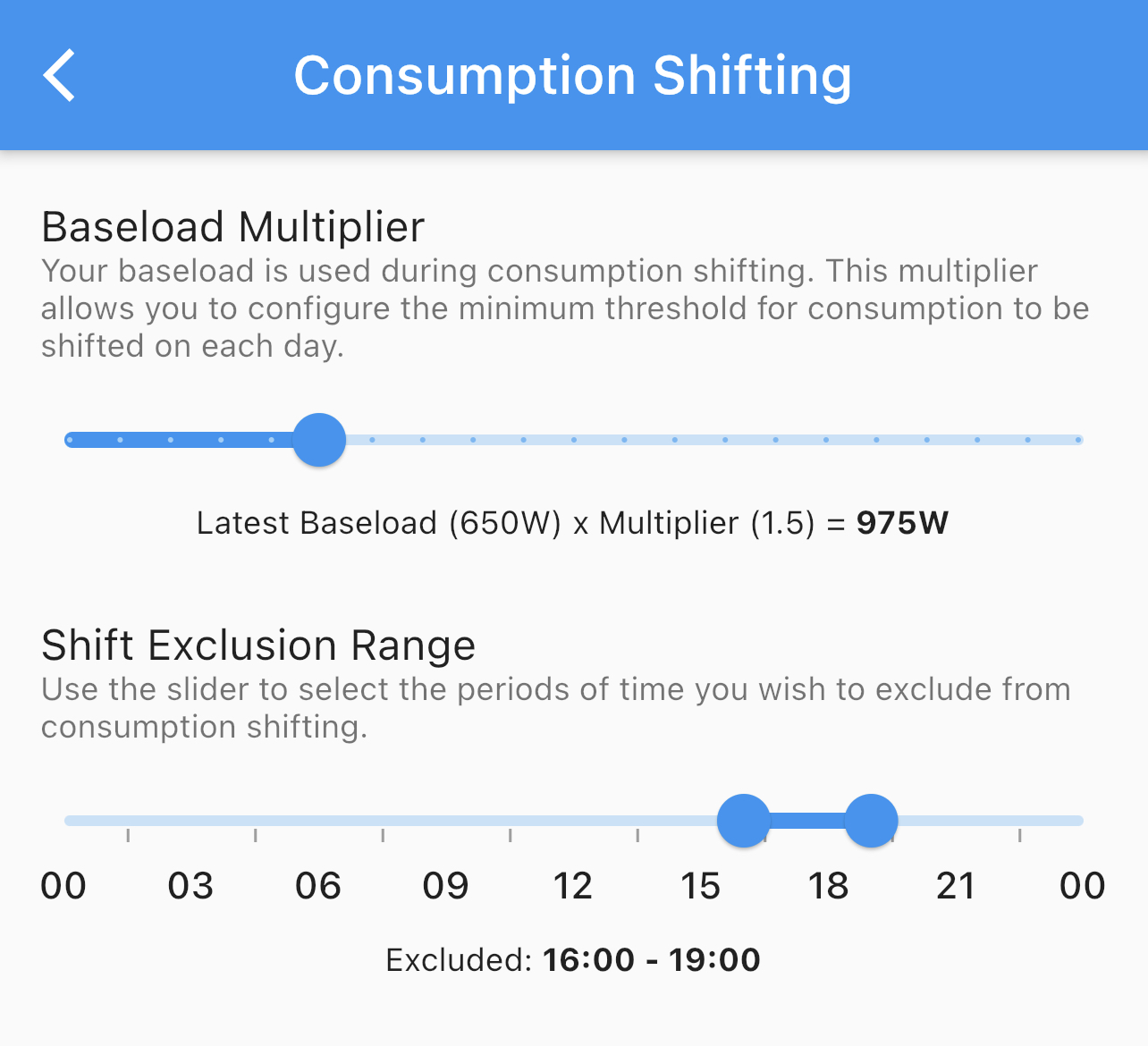
Baseload Multiplier
We use your baseload to calculate which consumption points can be shifted at any one time. This means that your general usage of electrical items such as lights or other appliances that cannot be avoided are not shifted. We found from testing, multiplying this number by 1.5 creates a good balance to ensure large peaks are moved.
You may want the shifting to be more or less sensitive based on your needs and therefore you can change this value using the slider. We have included a dynamic example below the slider to show what the minimum shifted value would be based on your usage the day before, but the final figure will be slightly different for each day.
Defaults to 1.5
We recommend you try different figures to find the best balance. Setting this multiplier to 1 can be beneficial if you don't often have large peaks of usage.
Shift Exclusion Range
Some usage typically shouldn't be shifted, especially around times where you cannot avoid using electric. This will be different for everyone and therefore we allow you to configure this dependant on your needs. You may prepare and cook between the peak times of 16:00 - 19:00 using an electric cooker and it's unlikely that you can shift this, therefore you should exclude this time so that Octopus Compare doesn't move your consumption.
Defaults to 16:00 - 19:00 as this is peak time and often usage between this time is unavoidable
Roadmap
As mentioned above, Consumption Shifting is a Beta feature and is subject to change between versions. We will be listening heavily to feedback to help improve the accuracy, reliability and efficiency of this feature.